
a. SSO: general principle
SSO (Single Sign-On) is a simplified login mechanism. It allows you to access all your digital tools by authenticating only once. Once connected to your work environment, you can directly access the linked applications without having to re-enter your credentials.
The deployment of SSO is a progressive process that starts with establishing a link between systems, before being extended to all the services used.
b. Federated authentication: the first step
Federated authentication is the mechanism that enables this connection. It acts as a link between your organization and an external service.
For SSO to be possible with a third-party service, the two systems must first be able to communicate. This technical step establishes the connection required for your professional identity to be recognized: your organization securely confirms that you are authenticated, which prevents you from having to create a new account or share your personal information.
In this article, we detail the two authentication methods: federated authentication and classic authentication.
2. Why use federated authentification
a. For the company: stronger and consistent security
Protection of digital identity: the organization applies its own security standards (such as two-factor authentication) to ensure that access to all connected services is always protected.
Data sovereignty: credentials are never transmitted to external services. Only an authentication assertion is sent, which allows you to retain full control over sensitive information.
Access synchronization: access to tools is directly tied to the professional account. When an employee joins, leaves, or changes role, permissions are automatically updated from a central point, managed autonomously by the client company.
b. For the user: everyday convenience
Simplified login: you use your usual professional credentials to access your tools, without creating or managing additional accounts.
Automatic recognition: once authenticated on your internal network or portal, compatible applications recognize you without any extra steps.
Fast usage: switching from one service to another is seamless. No more interruptions to enter a password: your work continues without disruption.
3. Two ways to access the Desk
a. Federated authentication (via a professional account)
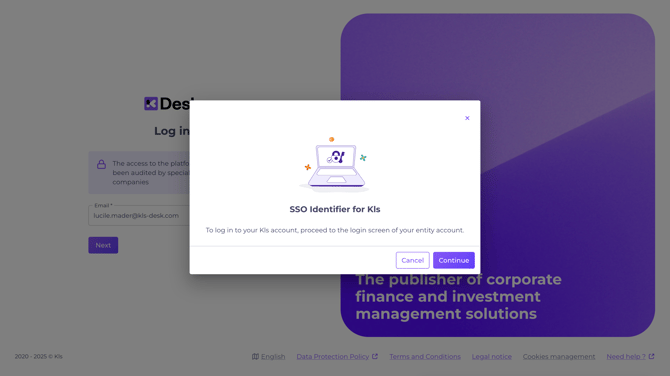
Federated authentication is the preferred login method for large organizations to centralize security and simplify access.
💡 User experience:
- Enter your email address on the Desk login page: https://app.kls-platform.com/
- The system automatically redirects you to your internal portal (your organization’s portal) so that you can authenticate there.
- Once connected via your internal portal, you are granted access to the Desk.
Technical note: SSO association is based on the domain name of your email address. If your domain is configured, redirection happens automatically.
b. Classic authentication (via a dedicated Desk account)
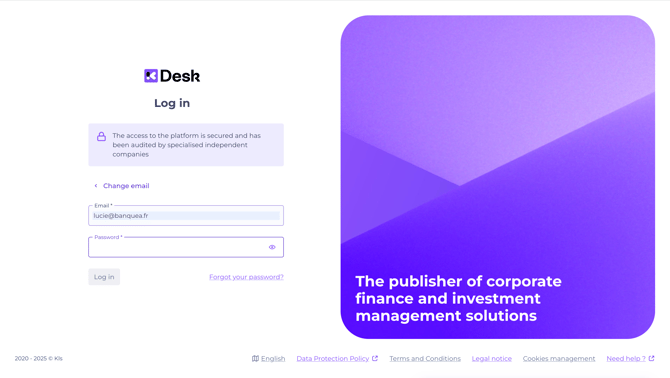
With this method, you use a specific account created for the Desk. Your credentials are limited to the use of this platform.
💡 User experience:
- Enter your email address and your Kls password directly on the Desk login page: https://app.kls-platform.com/
- Once your information has been correctly entered, click on “Log in” to access the Desk.
Would you like to implement federated authentication within your organization? To learn more, contact us at: support@kls-desk.com