
Contents |
Introduction to Debt Eligibility
Debt Eligibility is a tool for creating and managing guarantee or subsidy programmes, and distributing them via a network of trusted parties.
Debt Eligibility is designed:
- To make it easier for the network to sign up to programmes, through a clear and educational eligibility engine.
- To simplify the monitoring, management and reporting of guarantee envelopes.
The app is highly flexible and adapts to a wide variety of needs:
- Programmes guaranteed by third parties (EIB, EIF, government guarantees, BPI, EBRD, etc.).
- Programmes linked to international agreements (Green Loan, Sustainable Linked Loans, ESG, etc.).
- National, regional or local subsidy programmes.
- Private guarantee programmes specific to the company's internal strategy.
The app relies on two distinct roles:
- The programme manager, a Kls user with rights to create, manage, validate and report on a programme.
- The distributor, a Kls user granted rights by a manager, enabling them to create files and report life events related to their subsidised loans or guarantees.
Each programme has its own independent dashboard, providing a complete view of envelope activity and consumption.
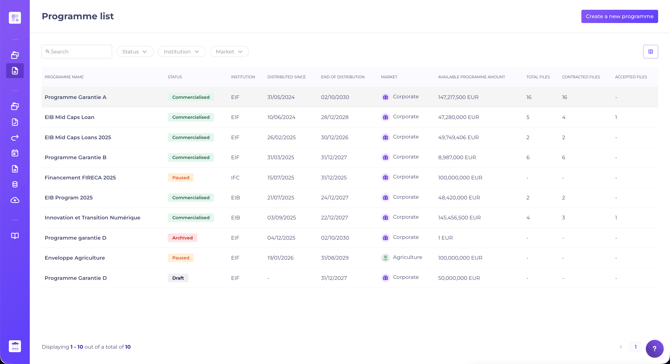
Debt Eligibility's functionality is structured around five key phases in the life of a programme:
Programme creation & setup > Reservation requests > Request validation > Activity reporting > Loan life.
Below is an overview of the features available at each phase, with links for further details.
1. Create and set up a programme
Programme creation is handled by a programme manager. The setup area defines the rules, eligibility conditions and specificities of the programme.
Setup is divided into six tabs:
- Programme identity: general details (envelope amount, duration, guarantee coverage, etc.).
- Eligibility settings: configure eligibility criteria. From a simple Yes/No question to complex conditions, this is where the distributor's eligibility form is built.
- Portfolio settings: segment the distribution of the envelope by programme-wide conditions. For example, reserve 20 % for customers rated below D, or for SMEs.
- Loan life settings (optional): enable distributors to report defaults and guarantee calls on contracted loans.
- Reservation management: automatic rules for reservation duration and extension. If the deadline passes, the reserved amount is returned to the envelope.
- Distributors: list of users authorised to distribute the programme, with the option to segment by distributor.
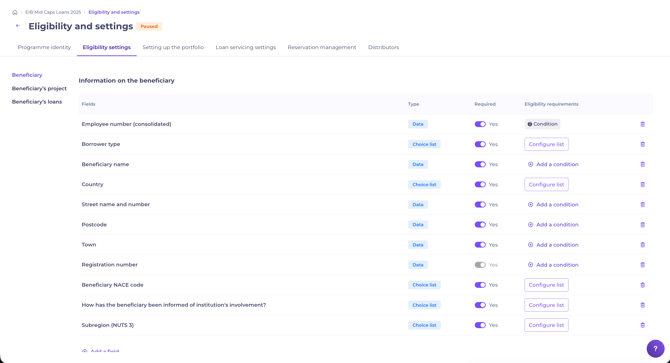
Once the programme is created, the programme manager launches distribution. The programme becomes accessible to authorised distributors, who can submit their first reservation requests.
Distribution can be paused at any time to update the programme parameters.
2. Submit a reservation request
When a programme is being distributed, authorised distributors access available programmes from their Kls Desk space.
For each request, the distributor creates a file and completes the eligibility form set up by the programme manager, directly with their client if needed. The eligibility result is displayed in real time based on the information entered.
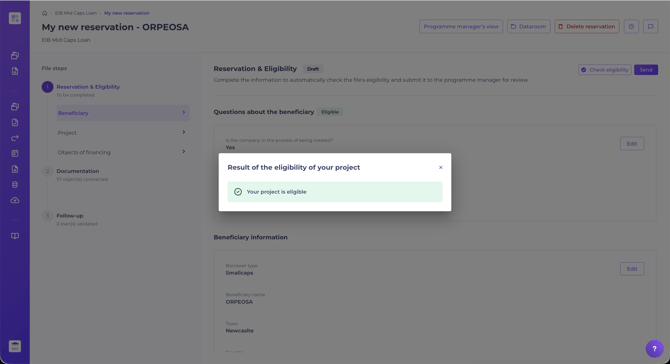
A file can contain one or several financing objects, depending on the beneficiary's project. Each file has its own dataroom to share documents and supporting information.
If all requirements are met, the distributor submits the reservation request to the programme manager. The guarantee amount is reserved on the programme envelope until the loan is documented.
3. Accept a reservation
This is the programme manager's first intervention in the distribution process.
The programme manager reviews the request and supporting documents, then decides on the next step.
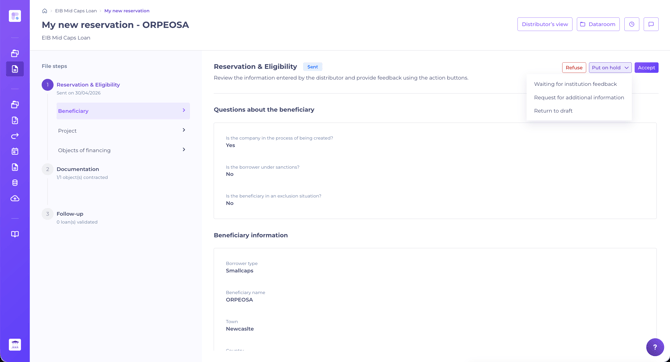
For each request, the programme manager can:
- Decline the request, for example if the information is incorrect.
- Awaiting institution response, if the guarantor organisation needs to be consulted.
- Awaiting additional information, if documents or information from the distributor are missing.
- Return to draft, if the request is incomplete.
- Accept the request, if everything is compliant.
In all cases, the action is communicated to the distributor by email notification.
Once the request is accepted, the file moves to the documentation step. The distributor fills in the contractualisation details for each financing object, or may abandon it. Each object follows its own lifecycle: the programme manager may validate, decline, or cancel the documentation of each object independently.
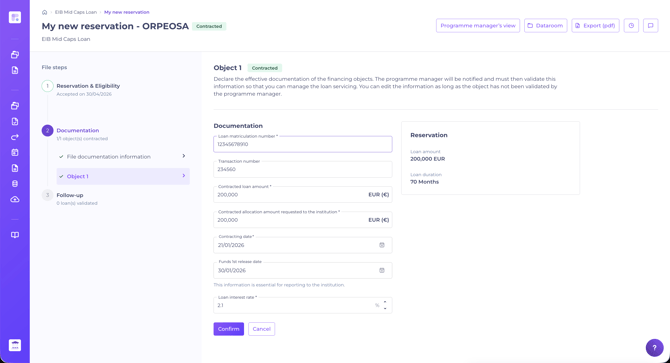
If the "Loan life settings" option is enabled on the programme, the distributor can report key events on the loan to the programme manager.
4. Programme activity reporting
A data extraction module is available on each programme. It simplifies reporting, whether for the institution, regulatory reports or internal needs.
All files, financing objects and loans are centralised, so the programme manager generates bespoke export templates as needed.
💡 Data from third-party sources can be integrated using a dedicated data template.
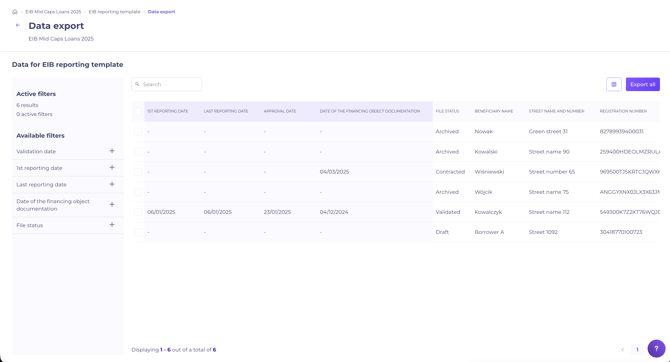
The module also allows tracking of all key reporting dates.
Once the template is configured, the programme manager generates an Excel file for the institution or for internal use.
The reporting view is also where the programme manager informs distributors whether their requests have been accepted and validated by the institution. The programme manager simply updates the Validation date on the relevant financing objects: distributors are notified by email.
5. Loan life
On each programme, the programme manager can enable the "Loan life settings" option, which gives access to customisable event lists (early repayment, refinancing, default, etc.).
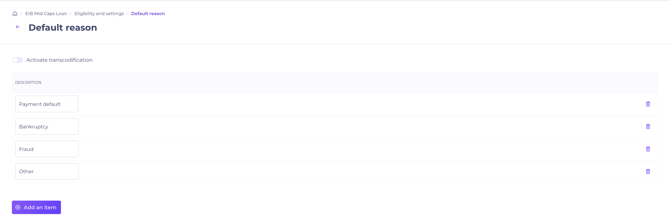
The distributor can then log any event considered significant on each validated financing object. Each declaration triggers an email alert to the programme manager.
This option helps the programme manager stay close to the reality of their guaranteed loan portfolio and detect anomalies or events that require attention.
For further guidance, see our article on managing events and guarantee calls: As a distributor, how to manage loan events and guarantee payment demand?