
Introduction
This guide is intended for Kls Desk users with a programme manager role and should be read after the initial guide: Creating a programme on Debt Eligibility.
Once your programme is created, you launch distribution to selected distributor users by clicking "Publish programme". This makes the envelope visible to your distributors, who can then submit their first reservation requests.
Please note, no notification is sent to distributors upon publication. You must communicate the availability of a new programme yourself.
1. Consumption monitoring
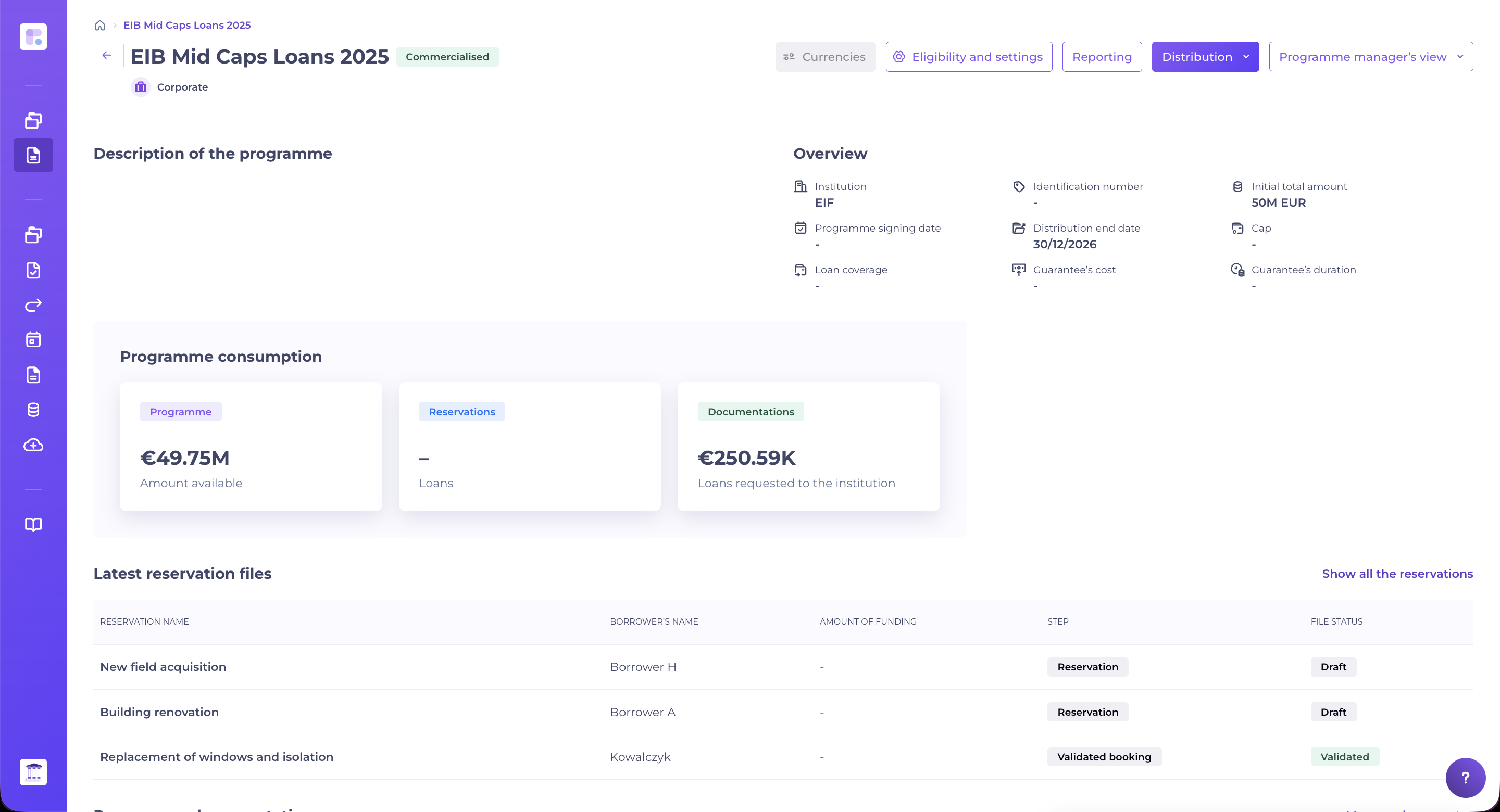
Once your programme is launched, you can monitor the consumption of the envelope allocated to your programme via the dashboard. To do so, use the side navigation bar and click on the programme of your choice.
You see in real time:
- The amount available, which corresponds to the funds remaining in your envelope (after subtracting reservations and contracted loans).
- The amount of reservations, which corresponds to current reservation requests not yet contracted.
- The amount of contracted loans, which is the sum of all credits formalised with this envelope.
This view, also visible to distributors, helps you better manage the distribution of your programme and take action as reserves near depletion.
2. File follow-up
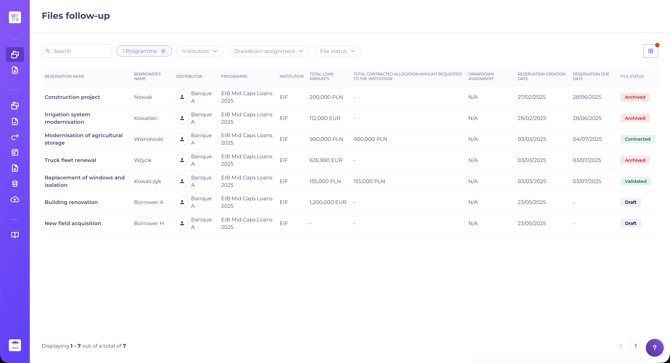
This page is accessible from your side navigation bar and gives the programme manager a view of all files entered for the programmes under management.
You can:
- Search for a file by file name or borrower name
- Filter by one or more programmes
- Filter by one or more file statuses
- Filter by one or more institutions
- Filter by draw assignment: not assigned, partially assigned and/or assigned
- Show/hide columns to customise your view
Filters are persistent.
Each file has its own dedicated space, which allows the programme manager to:
- Check the information entered for a reservation request
- Consult the file dataroom to retrieve supporting documents
- Communicate with the distributor through comments: the distributor can reply and all comments are tracked within the file
- Act on the file status:
- Decline the request, which automatically archives the file
- Place the request on hold, in any of three cases:
- Awaiting institution response, when clarification is needed from the guarantor
- Awaiting additional information, when a document or piece of information is missing from the distributor
-
-
- Send back as a draft, which gives the distributor the opportunity to update the reservation request information
- Accept the request, from the "Accept" button's dropdown menu:
- Accept, the distributor can then proceed to the documentation step.
- Conditionally accept, if the borrowing company's registration number is not yet available (company being incorporated). You provide a mandatory reason, added to the file's comment thread and highlighted to the distributor via a banner in the "Company information" tab. The file moves to the "Conditionally accepted" status: documentation stays locked and the distributor must first complete the "Company information" block before resubmitting the request to you, with no limit on the number of round trips.
-
-
Find your "Conditionally accepted" files at any time by filtering the file list by status, just like any other status.
-
Depending on the programme's configuration, the "Company information" block may include: the company name (always shown), the company's incorporation date, its registration number (SIRET or tax ID), the underlying company's registration number, the beneficiary's NAF code, the beneficiary's NACE code, the beneficiary's or underlying company's NACE code, and the borrower's final rating.
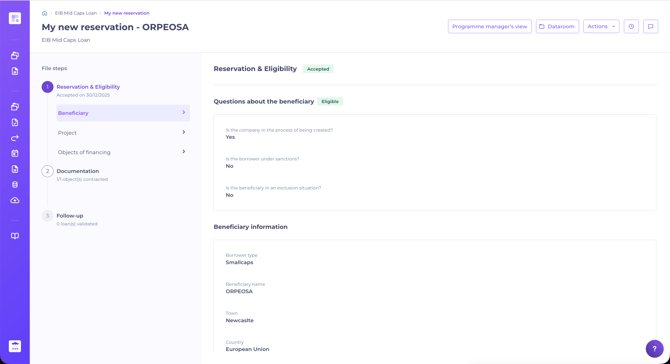
A file follows a 3-step path, accessible from the file's stepper:
- Reservation & Eligibility
- Documentation
- Loan monitoring
Once the reservation request is accepted, the file moves to step 2. A file can contain several financing objects, each with its own lifecycle independent of the file.
At the contractualisation step, each financing object follows its own lifecycle, independent of the dossier status.
For each financing object, the distributor can:
- Document the financing object by filling in the required details and explicitly submitting to the programme manager → the object moves to status Documented
- Abandon the financing object → the object moves to status Abandoned (irreversible action)
For a documented object, the programme manager can:
- Validate the object → status Validated
- Decline the object (following a refusal issued by the institution) → status Declined (irreversible action, reason required)
- Cancel documentation → the object reverts to Awaiting documentation status; previously entered data is retained
The dossier status is updated automatically by aggregating the statuses of its financing objects:
- At least one financing object Documented → dossier Contractualized
- At least one financing object Validated → dossier Validated
Step 3 (Loan monitoring) is only available on financing objects with the Validated status, and only if "Loan life settings" is enabled on the programme.
For further information, refer to this guide to credit event management.
3. Programme modification
A programme can be modified, even once published.
Whether you need to update eligibility criteria, add distributors, or authorise the reporting of post-contract credit events, you can revise an existing programme, even while it is being distributed.
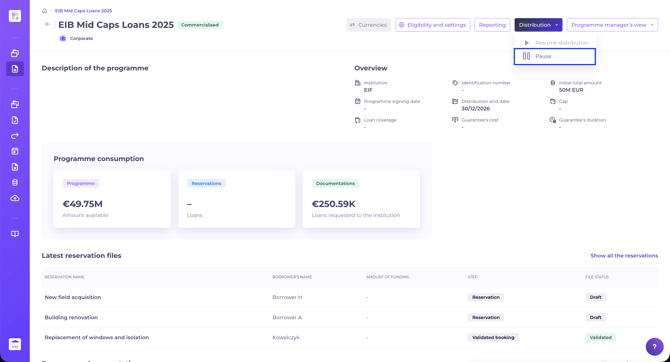
To do this, simply pause the programme. This unlocks the "Manage programme" button, which gives you access to the configuration area.
For further information on the available settings, please consult the dedicated article.
Once your changes are made, remember to put the programme back into distribution, using the same button as for pausing. Otherwise, your distributors cannot submit new reservation requests.
4. Reporting
The Debt Eligibility reporting tool allows the programme manager to:
- Import data not collected through the Kls Desk (e.g. CRD and other financial information) into the reporting system
- Create simplified regulatory reports with all file information
- Update file information, such as final validation of financing objects, key dates, etc.
For more information, see our dedicated article on Debt Eligibility reporting.