
Sommaire |
1. What is Two-Factor Authentication (2FA)?
2FA is a security protocol requiring two authentication factors to verify your identity. To ensure maximum reliability, industry standards generally combine two distinct criteria:
-
A knowledge factor : Something only you know (your password).
-
A possesion factor : Something only you hold (such as access to your professional email).
2FA strengthens your access security : After entering your usual password, Kls Desk will ask you to confirm your identity using a unique code sent to your email.
💡 If you use federated authentication (SSO), 2FA is disabled:
-
La 2FA is a verification method. Kls Desk requires a second proof of identity (a one-time code sent by email) to validate access.
-
Le SSO is a company-managed login method. You access Kls Desk using your corporate session (Microsoft, Google), without a dedicated password. (Learn more about SSO here.)
When your organisation uses SSO, authentication is handled internally by your company. As a result, Kls Desk 2FA does not apply to your account.
2. Why secure my account?
At Kls, we continuously raise our security standards to provide you with ever-stronger protection. Implementing 2FA marks a new level of security by addressing three critical challenges: :
-
Activity verification: A validation is required every 30 days to confirm that the user still has access to their professional email account (a key safeguard following an employee’s departure.)
-
Protection against data theft: If your password is compromised, your account remains inaccessible without validation of the second factor.
-
GDPR compliance: This additional security layer ensures optimal protection of your clients sensitive data, in line with current regulatory standards.
3. When is verification required?
Verification adapts to your usage and is only required in the following situations:
-
Your first login to Kls Desk.
-
A login from a new browser (e.g. switching from Chrome to Edge).
-
A login from a new device.
- Every 30 days, to renew trust in your device.
When entering the verification code, tick “Trust this browser”. Kls Desk will remember your device, and you will not be required to verify again on it for the next 30 days.
4. How 2FA works on Kls Desk?
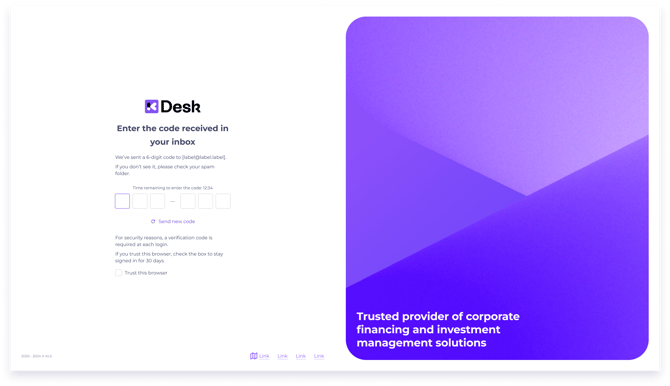
Logging in with 2FA involves three quick steps:
-
Credentials: Enter your email address and password.
-
Security code: Retrieve the 6-digit code automatically sent to your email.
-
Validation: Copy the code in Kls Desk to complete the login process.
For security reasons, you have 15 minutes to enter your code or request a new one. After that, you will need to sign in again using your email address and password.
💡Tick “Trust this browser” before entering the code. Once the code is entered, you are redirected straight to the application.
5. Best practices
-
Didn’t receive the code? Check your "Junk" or "Spam" folders.
-
Secure your email account: Email-based 2FA relies on the security of your inbox. Make sure your email account is protected with a strong password.
-
Stay vigilant: No member of the Kls team will ever ask for your 2FA code — by phone, chat, or email.
-
Accept cookies: When signing in, you must accept cookies for the “Trust this browser” option to be saved.
-
Change of environment: If you switch browser or device, or if your cookies are deleted (e.g. due to an internal security policy or certain VPN/proxy environments), you will need to tick “Trust this browser” again.